Trading Type
Spot
Trade crypto freely
Promotions
Gate Dubai is operated by Gate Technology FZE and licensed by the Dubai Virtual Assets Regulatory Authority (VARA) to provide virtual asset exchange services. This guide explains how to register, complete KYC verification, prepare the required documents, and address common registration issues.
Before starting registration, make sure you meet the platform’s eligibility requirements and have the necessary information ready.
Gate Dubai’s User Agreement sets out the conditions for using its services. Individual users must generally be at least 21 years old or the age of majority in their country of residence, whichever applies under the agreement. They must also reside in a jurisdiction where Gate Dubai services are available and must not be accessing the platform from a restricted location.
Meeting these requirements does not automatically guarantee access to every service. Additional eligibility checks and verification requirements may apply.
Gate Dubai requires users to provide basic account information during registration. According to its User Agreement, this includes:
Make sure your information is accurate and that you can access the email address you provide.
Gate Dubai requires identity verification as part of its account-opening process. Depending on your circumstances, you may need to provide a valid government-issued identification document, residential address information, and additional personal or financial details.
For proof of address, the Gate Dubai Help Center lists examples such as a utility bill, bank statement, Ejari or rental agreement, and title deed. The document must meet the platform’s requirements, including being issued within the last three months.
Review the official identity verification guide before beginning the process.
Follow these steps to register through the official website.
Open the Gate Dubai Sign Up page.
Check that you are using the official regional website before entering personal information. Follow the registration instructions displayed on the page.
Provide the requested registration details, including your full name, email address, and password, as instructed by the platform.
Choose a strong, unique password that you do not use for other websites or services. If the registration interface requests additional information or confirmation, follow the on-screen instructions.
Read the Gate Dubai User Agreement, Privacy Policy, and other applicable policies before proceeding.
These documents explain the conditions governing account use, identity verification, eligibility, and access to the platform’s services. Make sure you understand the relevant requirements before accepting them.
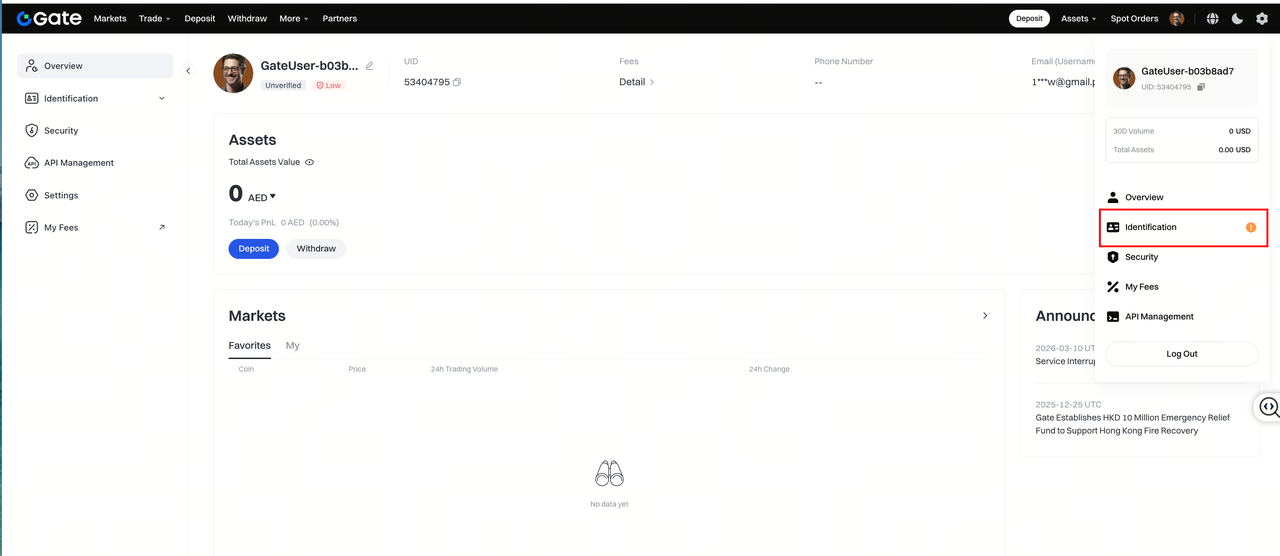
After completing the registration process, log in to your account and navigate to the identity verification section.
According to the official Gate Dubai Help Center, the verification path is:
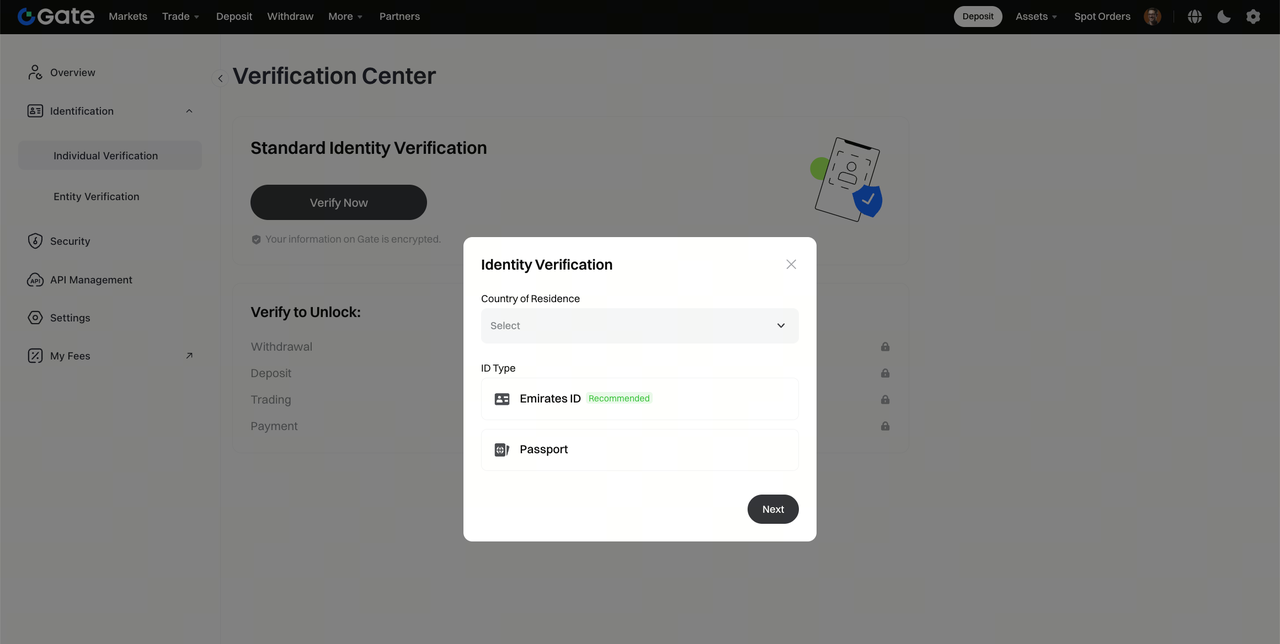
Avatar → Identification → Individual/Entity Verification → Verify Now
Select the appropriate verification option and follow the instructions displayed on the platform.
Select your country of residence and identification document type as requested. The platform will direct you to the identity verification interface.
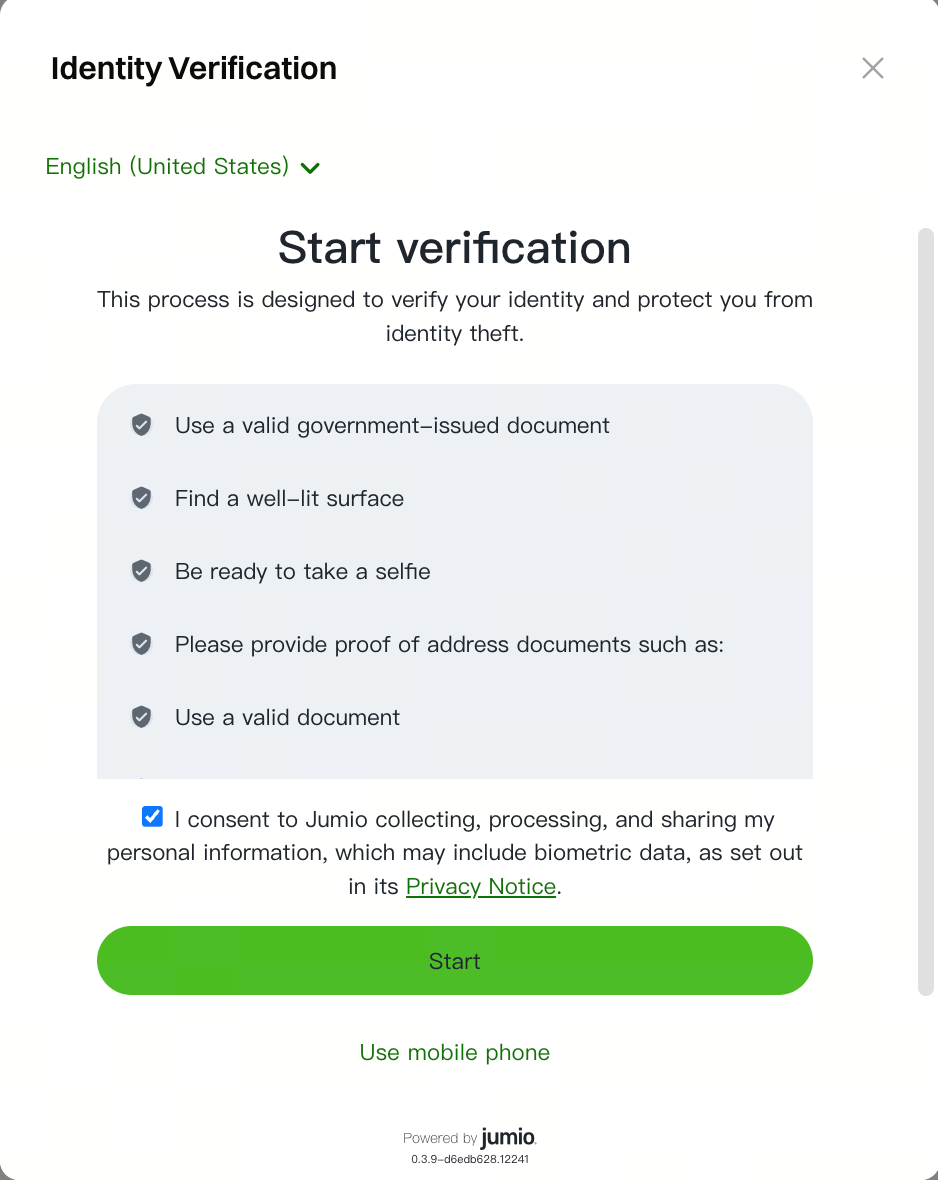
The published guide describes two available methods:
The methods available to you may depend on the platform’s current verification flow and your circumstances.
Make sure your identity information matches your official documents and that your identification document is valid and unexpired.
Gate Dubai’s published identity verification guide requires a valid proof-of-address document.
Examples include:
The document must have been issued within the last three months and meet the following requirements:
Review the file carefully before submitting it. Incomplete, illegible, or unsupported documents may be rejected.
After the relevant identity verification stage is approved, follow the instructions to complete the remaining information.
The official guide lists personal information such as:
You may also need to provide your residential address, including your apartment or villa number, building or community name, street, area, and city. Postal code requirements may vary.
Enter the information accurately and ensure that it is consistent with your supporting documents.
Gate Dubai may request financial information as part of its verification and due diligence procedures. The published guide includes employment status, annual income, source of funds, and investment objective among the requested details.
Provide truthful and complete information. Depending on the account and the platform’s verification requirements, additional documentation or information may be requested.
Review your entries and submit each section according to the on-screen instructions.
Once you have submitted the required information, Gate Dubai will review your verification application.
According to the official Help Center, the result will be communicated by email. Processing times may vary, so check your registered email address for updates or requests for additional information.
If you need assistance, the published guide lists the following support email: support_dubai@gate.com.
Completing registration establishes your account, but access to Gate Dubai’s services depends on successfully meeting the applicable verification and eligibility requirements.
Once your account is approved and eligible to use the platform, you can review the available virtual assets and spot trading pairs. Before placing an order, check the trading pair, order details, and applicable fees displayed by the platform.
You should also take steps to protect your account:
Gate Dubai’s User Agreement prohibits unauthorised third-party operation of accounts. Keep your account details accurate and update them when necessary.
Verification may be unsuccessful if the submitted information does not match your identification document, the document has expired, or the required information is incomplete or illegible.
Check the reason provided by the platform, correct any discrepancies, and resubmit the required information according to its instructions.
Common issues include submitting a document older than three months, uploading a screenshot instead of the original PDF, omitting pages, or providing a document that does not clearly display your name, residential address, issue date, and issuer’s logo.
Review the proof-of-address requirements and submit a complete, unaltered document that meets the criteria.
Gate Dubai’s published User Agreement states that users must complete the required verification procedures before they are permitted to open an account or use Gate Dubai services. Registration alone does not guarantee access to trading or other services.
Check the inbox and spam folder of your registered email address for messages from Gate Dubai. If there is no update or you need clarification, contact the official support team using the contact information published by Gate Dubai.
Creating a Gate Dubai account involves registering through the official website, providing accurate account details, reviewing the applicable terms, and completing the required identity verification. Users should prepare a valid identification document and proof of address before starting to reduce avoidable delays.
Before accessing the platform, confirm that you meet Gate Dubai’s eligibility requirements and understand its applicable terms. To get started, visit the official Gate Dubai registration page and follow the instructions provided.
Visit the official Gate Dubai registration page, provide the requested account information, review and accept the applicable terms, and complete the required identity verification procedures.
Yes. Gate Dubai requires users to complete the applicable identity verification procedures before opening an account or accessing its services. Additional information may be requested depending on the verification requirements.
You will need a valid government-issued identification document and may need to provide proof of address. Accepted proof-of-address examples include utility bills, bank statements, Ejari or rental agreements, and title deeds that meet the platform’s requirements.
Gate Dubai’s published identity verification guide requires proof of address issued within the last three months. The document must be complete, legible, unaltered, and submitted in the required format.
The processing time can vary depending on the application and whether additional information is required. Gate Dubai states that verification results are communicated by email. Check your registered inbox for updates.
Gate Dubai’s User Agreement states that individual users must be at least 21 years old or the age of majority in their country of residence, whichever applies under the agreement. Users must also meet the platform’s residency and other eligibility requirements.
Consult the official Gate Dubai identity verification guide or contact support_dubai@gate.com for assistance with verification-related questions.
* The information is not intended to be and does not constitute financial advice or any other recommendation of any sort offered or endorsed by Gate.
* This article may not be reproduced, transmitted or copied without referencing Gate. Contravention is an infringement of Copyright Act and may be subject to legal action.